Pricing and Plans
Wiring Studio offers four subscription tiers: Free, Lite, Pro, and Team. Each tier provides different limits on projects, sheets, AI features, and collaboration capabilities. Choose the plan that fits your team size and project complexity.
Plan Comparison
| Feature | Free | Lite | Pro | Team |
|---|---|---|---|---|
| Projects | 3 | 10 | Unlimited | Unlimited |
| Sheets per Project | 1 | 3 | Unlimited | Unlimited |
| Reusable Components | 5 | 25 | Unlimited | Unlimited |
| AI Features | No | Yes | Yes | Yes |
| Parts Library | Personal | Personal | Personal | Shared (org) |
| BOM & Cut List | Yes | Yes | Yes | Yes |
| PDF Export | Yes | Yes | Yes | Yes |
| Organization Support | No | No | No | Yes |
| Support | Community | Priority | Priority |
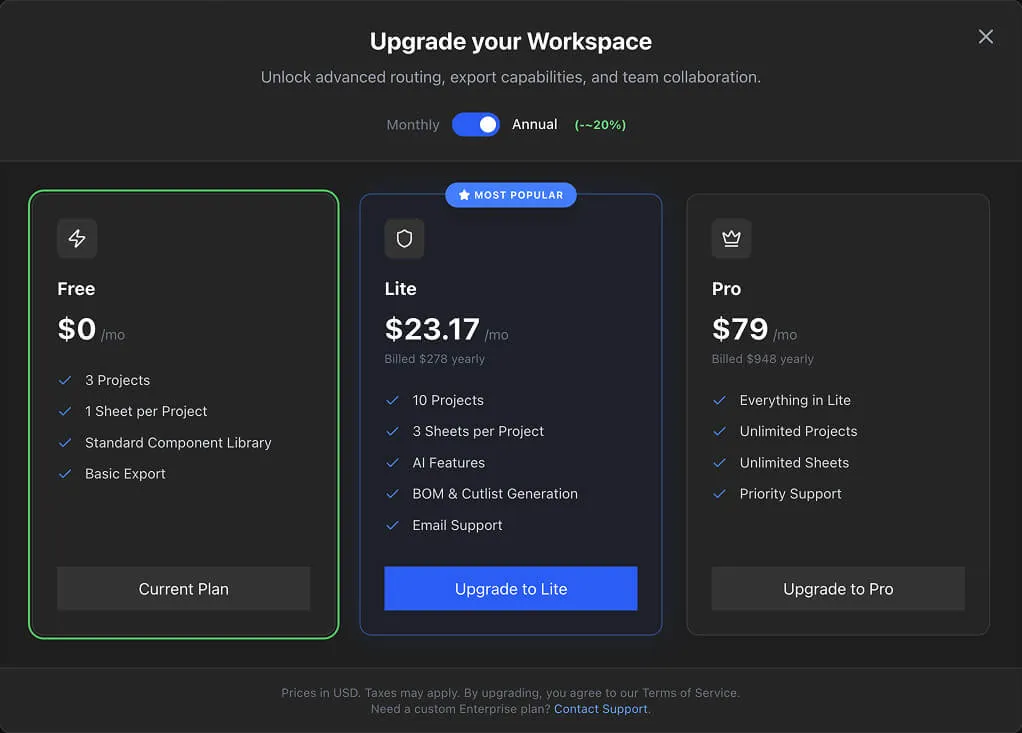
Free
The Free plan is designed for evaluation and small personal projects.
- 3 projects maximum
- 1 sheet per project
- No AI features — Auto-routing, AI image generation, and AI description generation are unavailable
- Personal parts library only
- Full access to Design View,Wiring View, BOM,Cut List, and PDF Export
- No credit card required
The Free plan gives you access to all core design and documentation features. The main limitations are project count, single-sheet restriction, and no AI.
Lite
The Lite plan adds more capacity and AI features for individual designers.
- 10 projects maximum
- 3 sheets per project — enough for multi-variant harnesses or zoned designs
- AI features enabled — Auto-routing, AI image generation, and AI description generation in the Parts Library
- Personal parts library
- Email support
- Monthly or annual billing (annual billing reduces per-month cost)
Pro
The Pro plan removes all project and sheet limits for professional use.
- Unlimited projects
- Unlimited sheets per project
- All AI features
- Personal parts library
- Priority support
- Monthly or annual billing
The Pro plan is suited for individual designers or small teams working on many projects simultaneously, without needing shared organization features.
Team
The Team plan adds organization support for team collaboration.
- Unlimited projects and unlimited sheets
- All AI features
- Shared organization parts library — All team members use the same parts inventory
- Organization support — Shared projects accessible to all members
- Per-seat billing — Each organization member is one seat (minimum 2 seats)
- Priority support
The Team plan is required for organization-owned projects. Without it, organization projects enter read-only mode.
See Collaboration & Organizations for details on setting up teams.
Feature Limits
What Happens When You Hit a Limit
When you exceed your plan's project or sheet limits, the affected resources enter read-only mode:
- A yellow warning banner appears at the top of the project
- All create, update, and delete operations are blocked
- Viewing and exporting data remain available
- No data is deleted — your projects and sheets are preserved
This can happen when:
- You create more projects than your plan allows
- You add more sheets than your plan allows
- Your organization does not have an active Team subscription
- You downgrade to a lower plan while over the new limits
Resolving Read-Only Mode
- Upgrade your plan to a tier that accommodates your current usage
- Delete projects or sheets to bring your count within the current plan's limits
Upgrade Flow
- 1
You encounter a limit — for example, trying to create a 4th project on the Free plan, or attempting to use auto-routing
- 2
A paywall dialog appears explaining the restriction
- 3
Click Upgrade
- 4
Select your target plan (Lite,Pro, or Team)
- 5
Choose a billing interval (monthly or annual)
- 6
Complete checkout via the embedded Stripe form
- 7
Your subscription activates immediately via webhook
- 8
New limits take effect right away — no page refresh needed
Info
Annual billing provides a lower per-month rate compared to monthly billing. If you plan to use Wiring Studio for more than a few months, annual billing is more cost-effective.
Organization Billing
Organizations use per-seat billing on the Team plan.
- Seat count — Each organization member is one seat
- Minimum — 2 seats (organizations must have at least 2 members)
- Billing — Monthly or annual, charged per seat
- Management — The organization admin manages billing through the Stripe customer portal
- Separate from personal — Your personal subscription (Free, Lite, or Pro) is independent of any organization subscription
Adding Members
When you invite new members to your organization, the seat count and billing adjust accordingly at the next billing cycle.
Downgrading
You can downgrade your plan at any time through the Stripe billing portal.
- Data preservation — No projects or sheets are deleted on downgrade
- Read-only mode — If your usage exceeds the new plan's limits, affected resources enter read-only mode
- Re-upgrade — Upgrade again at any time to restore full access
Tip
Before downgrading, check your current project and sheet counts against the target plan's limits. This helps you anticipate whether any resources will enter read-only mode.