From an empty sheet to a released cutlist
How Wiring Studio models a harness, what it derives from that model, and how each view feeds the bill of materials and the cutlist.
Chapters
Last updated 3 September 2026
Pricing and plans
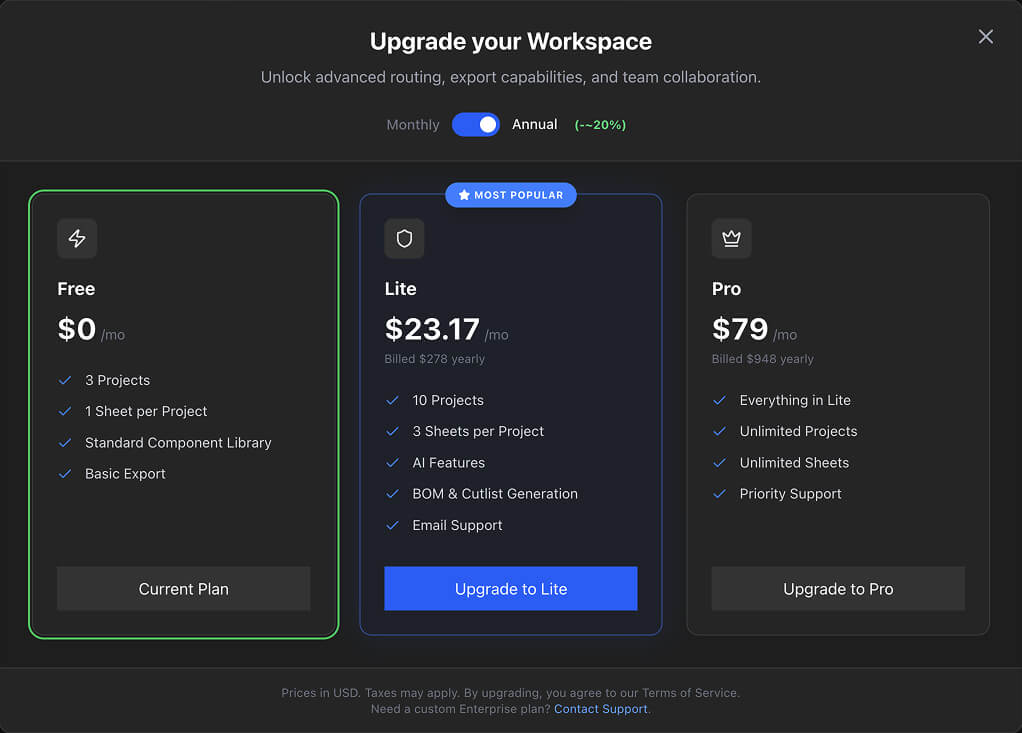
There are four plans. They differ on how much you can have and whether the AI features are available; the drawing, the wiring, the design rule checks, the BOM, the cut list and PDF export are the same on all of them, including Free.
The plans
| Free | Lite | Pro | Team | |
|---|---|---|---|---|
| Projects | 3 | 10 | Unlimited | Unlimited |
| Sheets per project | 1 | 3 | Unlimited | Unlimited |
| Reusable components | 5 | 25 | Unlimited | Unlimited |
| AI features | No | Yes | Yes | Yes |
| Parts library | Personal | Personal | Personal | Shared |
| Organisations | No | No | No | Yes |
| Support | Community | Priority | Priority |
Everything not in that table is on every plan: both canvases, pin configuration, Auto Route, design rule checks, shielded cables, the BOM and cut list, PDF export and the desktop app with its offline working.
What the AI features are
The AI features are the only capability a plan withholds. There are three of them, all in the parts library, and all optional:
- Image search — finding a real photo of a part from its manufacturer and part number.
- Image processing — cleaning an image into a side or top view.
- Description generation — writing a part description from its identity.
Excel import is AI-driven too, but it is not one of the three and is not withheld — it runs on every plan, Free included. What bounds it there is your project and sheet allowance: the import creates a project, and each harness in the workbook becomes a sheet up to your plan's limit, with anything beyond that folded into the last sheet.
Auto Route is not an AI feature and is not restricted. It runs on your own machine and is available on Free, offline included. See Wiring view.
Team and organisations
Team is what an organisation runs on. It is billed per seat — one seat per member, minimum two — and is a separate subscription from your personal plan.
- Every member sees every project the organisation owns.
- The parts library is shared, so the whole team designs from one set of parts.
- Seats added mid-cycle are prorated; reductions apply at renewal.
See Collaboration for how organisations work.
Hitting a limit
Going over a limit never deletes anything. The affected projects become read-only: a banner appears at the top, creating and editing are blocked, and viewing and exporting still work.
It happens when:
- You have more projects, sheets or components than the plan allows — usually after a downgrade.
- An organisation has no active Team subscription.
To get out of it, upgrade, or delete enough to come back under the limit.
Creating and keeping are checked slightly differently. Creation is blocked once you are at the limit; existing work only goes read-only once you are over it. So a Free account with exactly three projects can still edit all three, but cannot make a fourth.
Upgrading
There is no page to refresh. The subscription is confirmed over the open connection, so the app knows about it within seconds of checkout completing.
In the desktop app, checkout and the billing portal open in your ordinary web browser, and the new plan arrives back over the connection rather than through the browser. Both need a connection, so both are refused with a message when you are offline.
Annual billing costs less per month. The dialog shows both and the saving, so you can compare before choosing.
Downgrading
Downgrade at any time through the Stripe billing portal. Nothing is deleted: if your usage is above the new plan's limits, the affected projects or components go read-only until you upgrade again or bring the count down.
Check your project, sheet and component counts against the target plan before downgrading, so you know in advance what will be affected.
Related chapters
Where this chapter leads next, and what it assumes you have already read.
Collaboration
Organisations: shared projects, a shared library, real-time editing, access control and per-seat billing.
Reusable components
Save a sub-assembly or a whole sheet, wiring and pin configuration intact, and drop it into any project.
The desktop app
Project tabs, a native menu bar, automatic updates and designing offline, on macOS, Windows and Linux.