From an empty sheet to a released cutlist
How Wiring Studio models a harness, what it derives from that model, and how each view feeds the bill of materials and the cutlist.
Chapters
Last updated 3 September 2026
Sheets and workspaces
A sheet is one drawing. A project is a set of them, and the derived outputs are computed per sheet and combined only at export. Above that sits the workspace — your personal account, or an organisation — which owns the projects and the parts library.
The sheet bar
The sheet bar runs along the bottom of the project workspace, one tab per sheet.
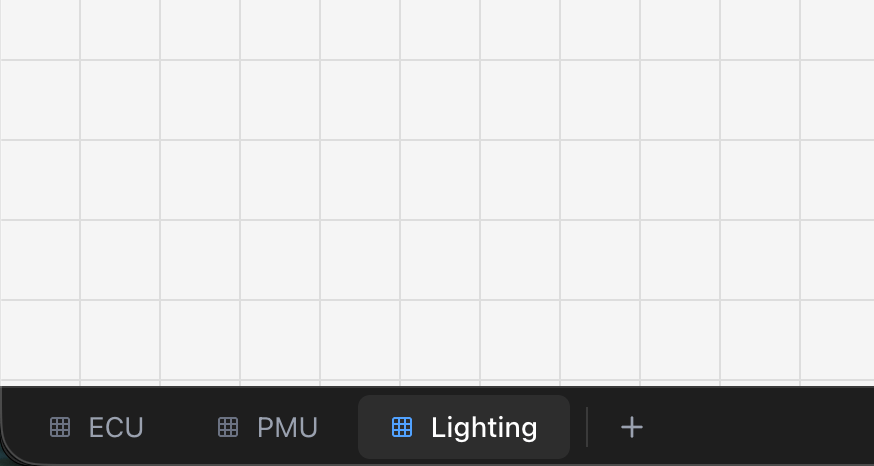
- Click a tab to switch to it.
- Double-click a tab, or right-click and choose Rename, to rename it. Enter saves, Escape cancels.
- Right-click a tab for Rename and Delete.
- + adds a sheet, subject to your plan's limit.
In the desktop app the Sheet menu holds the same commands, plus next and previous sheet and the first nine sheets by name.
Component-type projects — the ones behind reusable components — have exactly one sheet, so they have no sheet bar.
What a sheet holds
Each sheet holds its own copy of everything:
- Design components and cables.
- Wiring connections and their control points.
- The components instantiated from library parts.
- Pin configuration for every one of them.
- Cable labels and extra parts.
- Shielded cable configurations.
The BOM and cut list are computed for the sheet you are looking at. A PDF export is where several sheets end up in one document.
Deleting a sheet permanently removes everything on it, and cannot be undone. The last sheet in a project cannot be deleted.
Mating connectors across sheets
Sheets are independent, but a harness is not — a connector on the engine sheet plugs into one on the cabin sheet. Mating is how you record that.
The two connectors must have the same cavity count — that is the whole compatibility rule, and connectors that do not match are not offered.
What mating gives you
- A chip in the Pin Configuration header naming the mate and its sheet, which jumps straight to that connector's pin configuration.
- Network names that propagate through the mate, so one signal keeps its name across the whole project rather than restarting at each sheet boundary.
- Wire tracing that carries across the jump, so following a conductor onto another sheet keeps it highlighted when you land.
- Off-sheet wire counts in the Wiring view selection panel, so a connection continuing elsewhere is not mistaken for a dead end.
A mate is a two-way link. If one half goes missing — the other connector is deleted, or its part changes cavity count — the design rule checks report it as a broken mate or a mate mismatch.
When to use several sheets
- Harness variants — one sheet per variant where they share a structure but differ in specific connections.
- Vehicle zones — engine bay, cabin, boot, doors, mated to each other at the connectors that actually join them.
- Subsystems — power distribution, sensor circuits, communication buses.
- Revisions — keeping a previous state of a harness alongside the current one.
The sheet limit is per plan: 1 on Free, 3 on Lite, unlimited on Pro and Team. See Pricing and plans.
Workspaces
A workspace owns projects, components and a parts library. There are two kinds.
- Personal — yours. Your projects, your library, nobody else's.
- Organisation — shared with its members. Everyone sees the same projects and the same parts library. Requires the Team plan.
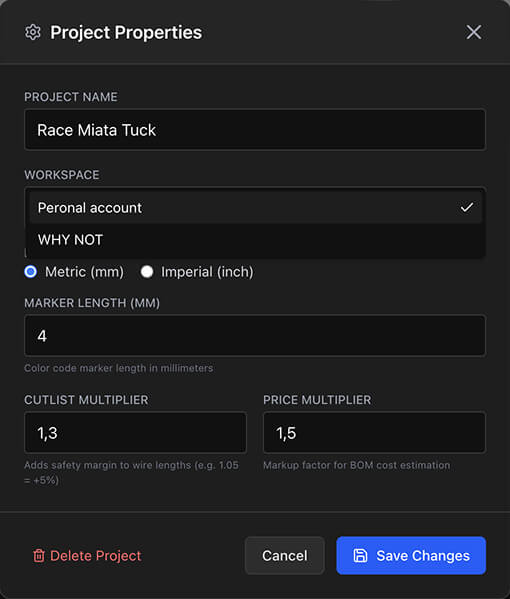
Switch between them from the workspace control in the header, or filter the Projects page by workspace. To move an existing project, open Project Properties and change Workspace.
Moving a project between workspaces needs a connection — the change goes through the server, so the control is disabled offline in the desktop app.
Collaboration covers organisations, members and the shared library in full.
Related chapters
Where this chapter leads next, and what it assumes you have already read.
Collaboration
Organisations: shared projects, a shared library, real-time editing, access control and per-seat billing.
Project settings
Four settings with a long reach — units, the cutlist and price multipliers, and marker length.
Reusable components
Save a sub-assembly or a whole sheet, wiring and pin configuration intact, and drop it into any project.